Model Extensions
Model Extensions add optional inputs, outputs, or controls to a model Node. Use them when you want to guide a model with reference media, supply a mask, set keyframes, or pass latent data between compatible Nodes.
The available extensions depend on the Node and the extensions already selected. Adding an extension exposes its row; you still need to connect the media it requires.
Open the menu
Click the + button in a Node’s Extensions header. Choose an item from the menu to add it. A Node without supported extensions has no extension menu.

Studio screenshot: the menu for Wan 2.1 offers an Image Reference and Latent I/O. Other models offer different choices.
Connect the rows
After adding an extension, connect a compatible output to its input port. Some extensions also expose outputs or sidebar controls: Latent I/O adds a Tensor output, while a Flux 3 Keyframe includes a time value.
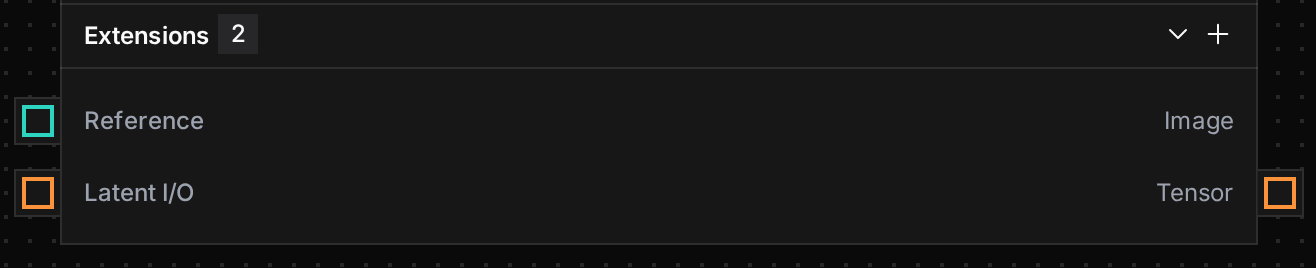
Studio screenshot: Reference and Latent I/O selected, showing their input and output ports.
Click the Extensions header to collapse or expand the selected rows. Use a row’s action menu to remove it. Repeated references are assigned to ordered input slots, so the order in which you add them can affect how the model receives them. Review the remaining connections after removing a row, because the extension selection can change which input slots are exposed.
Common extension types
| Extension | Use it for | Example Node |
|---|---|---|
| Reference | Guide a model with additional media | Wan 2.1, Flux 3 Image |
| First Frame / Last Frame | Guide the beginning or end of a video | MiniMax H3 |
| Keyframe | Place an image at a specified time | Flux 3 Video |
| Edit Video / Extend Video | Transform or continue a source clip | Seedance 2.5 |
| Mask | Supply a mask for an image or video edit | GPT Image 2.5 Flare |
| Latent I/O | Pass compatible latent Tensors into and out of a model | Wan 2.2 |
| Multiview | Add left, back, and right views of a 3D subject | Tripo H3.1 Image to 3D |
Why a choice can disappear
Extensions are not interchangeable plugins. The variety of model architectures and capabilities means that different Nodes can implement similar functionality in slightly different ways.
For example, Flux 3 Video offers keyframes or video extension, while MiniMax H3 separates first/last-frame guidance from reference media. Some audio-reference choices appear only after a visual reference is present.
The menu updates as you add or remove rows. Read the Model Extensions section on the Node’s reference page for its specific limits and combinations. Connected extension inputs can also take over settings such as dimensions, duration, or aspect ratio; Studio disables independent controls when the connected media determines them.
Example: start a Wan video from an image
- Add a Wan 2.1 Node and connect a Text Input to Prompt.
- Open Extensions → + and choose Reference.
- Connect an Image Input to the Reference row.
- Review the remaining video settings and run the Node. The reference supplies its spatial size.
This is a connection example; no generated result is claimed by the screenshots.