SAM3 Video
SAM3 Video tracks objects through a clip and produces a mask video. With a source Video and a Text description, it selects matching objects and combines their masks.
SAM3 Video is available only in the staging catalog. It is not included in the production Node catalog. Studio uses Meta's SAM3.1 video model.
The mask is an illustrative placeholder, not a checked segmentation result.
Track objects by description
- Add SAM3 Video to your Graph.
- Connect a clip from Video Input to Video.
- Connect Text Input to Text and describe the objects to include.
- Set Maximum Objects to the greatest number of objects you want tracked.
- Run the Node and inspect Mask.
Tracking proceeds forward from the first frame. The output combines selected objects into one mask; it does not provide a separate video for each object. Frames with no selected objects are black.
Guide tracking with points
Add the Points Model Extension to expose Positive points and Negative points.
Use Points Editor on a still image that matches the video's first frame. Place positive points on one object and negative points on areas to exclude from that object. Connect the two point outputs to their matching inputs on SAM3 Video.
The points select one object in the first frame. That object uses one Maximum Objects slot. With the limit set to 1, a point selection leaves no room for objects selected by Text. Increase the limit to allow both, or supply empty Text to use points alone.
At least one positive point is needed for a point selection. Negative points alone select nothing. Negative points refine the point-selected object; they do not remove objects selected separately by Text.
Apply the mask to the clip
Connect the source clip to Video on Mask Video, and connect SAM3 Video's Mask to its Mask input. Choose a black or white background for the unselected areas, then run Mask Video.
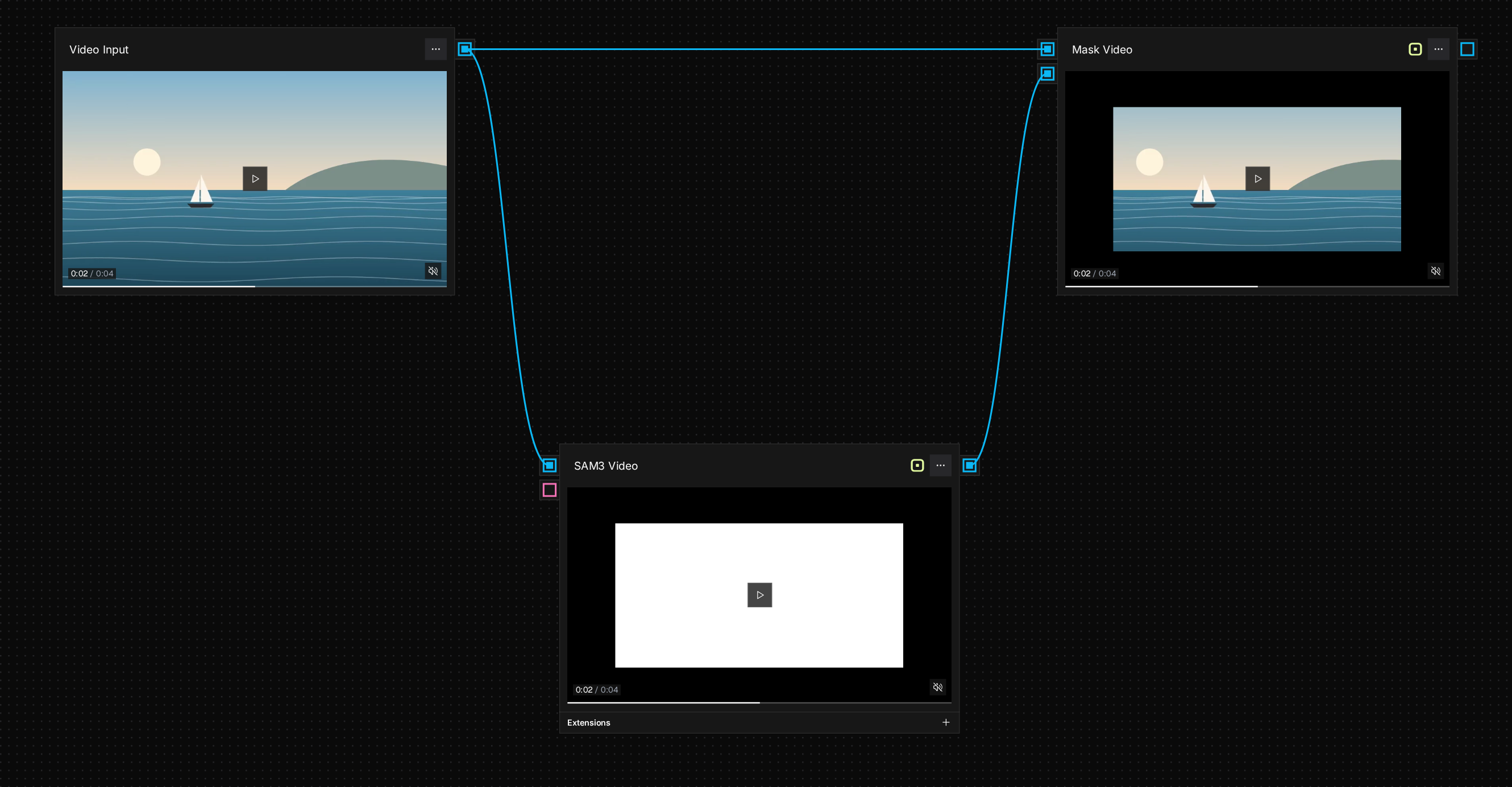
SAM3 Video used to isolate part of a coastal clip with Mask Video; the source, mask, and result are illustrative.
Limits and output
| Item | Behavior or limit |
|---|---|
| Source size | From 32 to 4,096 pixels per side, including Studio's shared Video minimum. Resize larger clips before connecting them. |
| Source timing | At least one frame and a positive frame rate no greater than 60 fps. Shared Video limits also apply. |
| Maximum Objects | A whole number from 1 to 32. It caps admitted tracks; it does not promise that many detections. |
| Text | Only the first 30 content tokens are used. Tokens are pieces of text, not a fixed number of characters. Keep descriptions short. |
| Empty Text | Accepted. Without positive points it supplies no useful selection prompt and Studio warns you. |
| Mask | A binary Video with the source width, height, frame count, and frame rate. White marks selected areas and black marks the rest. |
| Audio | Ignored for tracking. The mask video is silent. Mask Video keeps the original clip's soundtrack when applying the mask. |
The cost estimate uses the configured Maximum Objects limit, even if fewer objects appear in the result. Choose a limit that fits the scene.